Terraform on AWS: Building Production Infrastructure from Scratch
DevOpsInfrastructure
terraformawsinfrastructure-as-codecloud
Terraform on AWS: Building Production Infrastructure from Scratch
Infrastructure as Code (IaC) transforms how we provision and manage cloud resources. Terraform has become the de facto standard for multi-cloud infrastructure automation.
Why Terraform?
- Declarative - Describe desired state, not steps to achieve it
- Provider-agnostic - Same syntax for AWS, GCP, Azure, and more
- State management - Track what exists and what changed
- Plan before apply - Preview changes before execution
- Modular - Reusable components across projects
Project Setup
Directory Structure
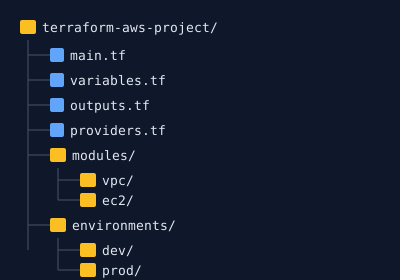
Provider Configuration
terraform {
  required_version = ">= 1.5.0"

  required_providers {
    aws = {
      source  = "hashicorp/aws"
      version = "~> 5.0"
    }
  }

  backend "s3" {
    bucket         = "my-terraform-state"
    key            = "prod/terraform.tfstate"
    region         = "us-east-1"
    encrypt        = true
    dynamodb_table = "terraform-locks"
  }
}

provider "aws" {
  region = var.aws_region
}
VPC Module
module "vpc" {
  source = "./modules/vpc"

  name               = "production"
  cidr               = "10.0.0.0/16"
  availability_zones = ["us-east-1a", "us-east-1b", "us-east-1c"]

  public_subnets     = ["10.0.1.0/24", "10.0.2.0/24", "10.0.3.0/24"]
  private_subnets    = ["10.0.11.0/24", "10.0.12.0/24", "10.0.13.0/24"]

  enable_nat_gateway = true
  single_nat_gateway = false  # Use true for dev, false for prod

  tags = {
    Environment = "production"
    Terraform   = "true"
  }
}
EC2 Instances
module "ec2" {
  source = "./modules/ec2"

  ami                    = "ami-0c55b159cbfafe1f0"
  instance_type          = "t3.medium"
  key_name               = var.key_name
  vpc_security_group_ids = [module.vpc.default_security_group_id]
  subnet_ids             = module.vpc.private_subnet_ids

  min_size = 2
  max_size = 6
  desired  = 3

  user_data = templatefile("${path.module}/user_data.sh", {
    db_host = module.rds.endpoint
  })
}
RDS Database
module "rds" {
  source = "./modules/rds"

  identifier     = "production-db"
  engine         = "postgres"
  engine_version = "15.4"

  instance_class = "db.t3.medium"
  allocated_storage = 100

  db_name  = "appdb"
  username = var.db_username
  password = var.db_password

  multi_az               = true
  db_subnet_group_name   = module.vpc.database_subnet_group
  vpc_security_group_ids = [module.vpc.database_security_group_id]

  backup_retention_period = 7
  skip_final_snapshot     = false
}
Best Practices
State Management
- Use remote state - Never commit
.tfstatefiles - Enable locking - Prevent concurrent modifications
- Encrypt state - Sensitive data may be stored
- Back up state - Version your state file
Security
# Never hardcode secrets
variable "db_password" {
  type      = string
  sensitive = true  # Marks as sensitive in logs
}

# Use AWS Secrets Manager
data "aws_secretsmanager_secret_version" "db_password" {
  secret_id = "prod/database/password"
}
Modularization
- Create reusable modules for common patterns
- Version modules with Git tags
- Use the Terraform Registry for community modules
Common Commands
# Initialize
terraform init

# Plan changes
terraform plan -out=tfplan

# Apply changes
terraform apply tfplan

# Destroy resources
terraform destroy
Conclusion
Terraform provides a robust foundation for infrastructure automation. Start simple, add complexity incrementally, and always use remote state with locking.